
Payment Plan

Below are instructions for setting up a payment plan for tuition at Arizona Western College.

How to Access TouchNet:

  1. Log into Self-Service
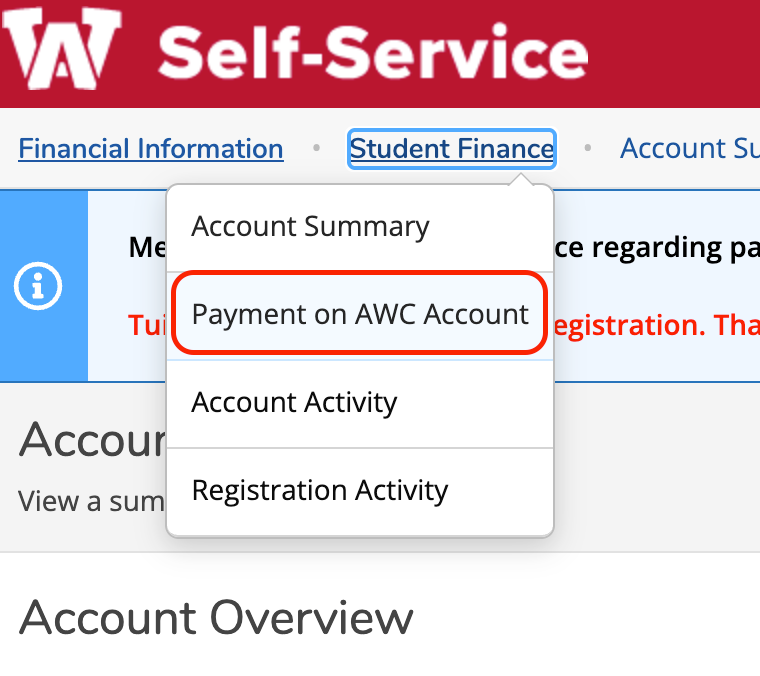
  2. Click on Student Finance 
  3. Click on Payment on AWC Account (see dropdown menu)
    Account Activity
  4. Select Make a Payment
  5. You’ll be directed to the TouchNet portal to make a one-time payment or set up a payment plan

Questions? 

Contact the Cashier’s Office at accounts.receivable@azwestern.edu or (928) 317-7666. 

Knowledge Base Search

Enter your search below and click the apply button.

Title Summary Updated
YubiKey Setup Text and phone call sign-in codes end February 1, 2027 Starting February 1, 2027, Microsoft will no longer send multi-factor authentication (MFA) codes by text message or phone call, because these…
Payment Plan Payment Plan Below are instructions for setting up a payment plan for tuition at Arizona Western College. How to Access TouchNet: Log into Self-Service Click on Student Finance …
Microsoft OneDrive Microsoft OneDrive How do I get started using OneDrive? Visit Microsoft's Official Microsoft Video Training site. Upload and save files and folders to OneDrive Upload photos and files to…
Canvas - Faculty Open Canvas Check Canvas Status Canvas Faculty Support Course Evaluation Checklist The Course Evaluation Checklist was provided by Instructure as a guide for best practices in…
Canvas - Students   Open Canvas Canvas 24/7 Support Check Canvas Status As part of AWC’s Strategic Plan objective focused on enhanced technology and our work to provide an amazing student experience,…
Self-Service What is Self-Service?  The Self-Service system encompasses several modules that allow students to plan and register for classes (Student Planning), view their financial aid (Financial…
Colleague SaaS Migration - Frequently Asked Questions Colleague SaaS Migration — Frequently Asked Questions Arizona Western College is migrating its Colleague platform to Ellucian's latest Software as a Service (SaaS) environment — a project 18 months…
CRM Engage - Students CRM Engage for Students Connect with resources/ask for assistance. Open CRM Engage ENGAGE allows currently enrolled students with a quick and easy way to connect with multiple resources.…
CRM Engage - Faculty CRM Engage for Faculty Refer students to resources. Open CRM Engage ENGAGE is a Customer Relationship Management (CRM) system designed to give AWC a set of data and…
CRM Engage CRM Engage Engage for Faculty Refer students to resources. ENGAGE offers faculty members a user-friendly early alert tool that enables them to refer students to various campus resources or…