Type “Control Panel” and press enter once its highlighted
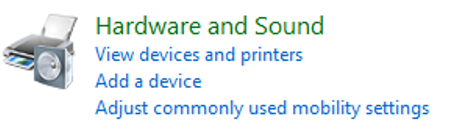
Select Hardware and Sound
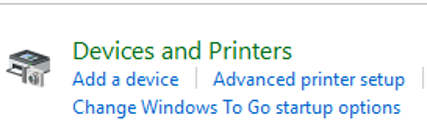
Devices and Printers
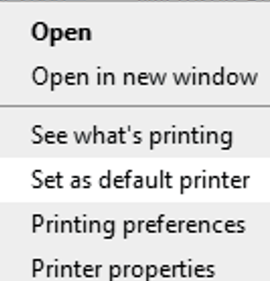
Under printer, right click on the printer you want to set as default and choose “Set as default” from the drop down menu. Control panel window can be closed
Knowledge Base Search
Enter your search below and click the apply button.
Why can I only share my documents with some people?
The Office 365 subscription is limited to only share files with other individuals who have an AWC student or employee account.
Please note, if…
One of the benefits of being a student or employee at Arizona Western College is access to Microsoft’s Office 365.
What is Microsoft Office 365 Education?
Office 365 is a Microsoft…
WHAT IS ZOOM?
Zoom is an application that allows cross-platform chat and video conferencing. It’s a tool for meetings and communication wherever there is a WIFI or Cellular signal. The college…
AWC’s Technology Service Desk is available to students, faculty, and staff
If you have questions about your account or password, visit the Account/Password support page.